ServiceM8 vs Jobber (2026): which fits your shop?
At a glance
What each one costs
ServiceM8 prices by job volume and never charges per seat. The plans are Free (30 jobs a month, 1 user), Starter $29, Growing $79, Premium $149, and Premium Plus $349, covering 50, 150, 500, and 1,500-plus jobs a month, the paid plans all with unlimited users (as of August 2026, servicem8.com/us/pricing). You pick the plan that matches how many jobs you run, then put your whole crew on it at no extra cost.
Jobber prices per user. Billed annually, Core is $29 a month for one user, Connect $99, Grow $149 with ten users included, and Plus $399 with fifteen, and every extra seat is $29 a month (as of August 2026, getjobber.com/pricing). Month to month runs higher: Core $49, Connect $139, Grow $199. A solo operator can sit on Core for under $30 a month annually and add seats one at a time.
The two structures reward different shapes of business. ServiceM8 keeps a fixed monthly figure no matter how many people you put on it, so the cost only moves when your job volume crosses a tier. Jobber's figure moves every time you add or remove a seat. For a small operator processing modest job volume, ServiceM8 is usually the cheaper line item; for a solo who does a lot of jobs, Jobber's single-seat price can win. Jobber's single-seat price can win.
The pricing fork: job count versus headcount
Here is the arithmetic the sticker prices hide. On ServiceM8 your cost rises when you do more jobs; on Jobber it rises when you hire more people. Those two curves cross in different places for different shops.
Run a three-tech crew doing around 150 jobs a month. On ServiceM8 that is the Growing plan at $79, and all three techs are included. On Jobber the same crew fits inside Connect at $99, which already includes five users, so there are no add-on seats. That is ServiceM8 Growing $79 against Jobber Connect $99, a gap of about $20. ServiceM8 is modestly cheaper here, and the gap only widens once you pass five techs, where Connect's included seats run out and Jobber starts charging $29 a head (or you step up to Grow's ten seats at $149).
Now flip it. A solo operator who runs a high volume of small jobs can push ServiceM8 up into the Premium $149 tier while still paying Jobber only $29 for a single Core seat. That is the case where Jobber's per-seat model wins. Most small trades are not in it. The typical shop adds people faster than it blows past job-count tiers, which is why ServiceM8's unlimited-user model tends to come out ahead for crews and Jobber's stays competitive for one-person operations.
The platform fork: iPhone-first versus cross-platform
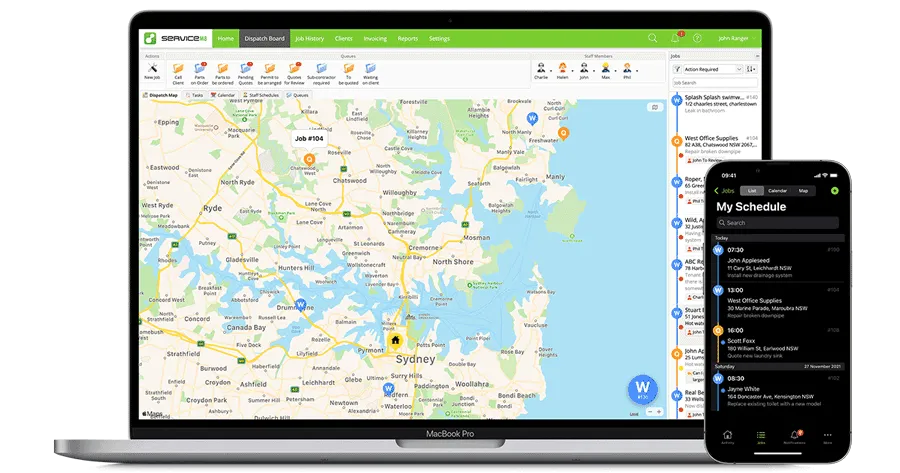
This is the line that decides most of these comparisons before price enters the room. ServiceM8's full app is built for iPhone, iPad, and Mac. Its Android app, ServiceM8 Lite, is a reduced tool meant for field techs and subcontractors, not a full replacement for the iPhone app or the office desktop. If a tech on your crew carries a Samsung, they hit missing features every day.
Owners raise this constantly, and it is usually the one thing that pulls them off an otherwise-cheaper tool. It is a hard stop, not a nuisance: an Android crew cannot run ServiceM8 the way an iPhone crew can, full stop.
Jobber runs the same app on iOS, Android, and the web. Mixed-device crews, a dispatcher who works from a browser, an owner on a Pixel: none of that is a problem. You give up ServiceM8's unlimited-user pricing to get there, but for a lot of shops that is a trade worth making.
Where each one pulls ahead
ServiceM8's strength is speed and value in the field. It is built around the idea that one visit is one job is one invoice, which is exactly how a sole trader or a small mobile crew works, and the app moves fast because of it. The flip side of that design shows up when a job does not fit the mold. Progress billing and multi-visit projects are where owners feel the software push back.
Jobber's strength is breadth and consistency. Owners tend to praise its app and support for consistency, and it handles the quote-schedule-invoice loop cleanly for a crew that is growing an office alongside its field work. It is the heavier of the two, and our call is that a one-person operation pays for a bundle it will not open. For that reader, ServiceM8 or a bare invoicing app is the leaner fit; for a shop adding staff and structure, Jobber's depth starts to earn its price. If you want the fuller picture on Jobber, our Workiz vs Jobber breakdown and our Jobber alternatives rundown go deeper on where it fits and where it does not.
Who should pick which
Pick ServiceM8 if your whole team runs iPhones or iPads and you want the cheapest path as you add people: sole traders, two-to-five person mobile crews, and Apple-first trades like cleaning, pressure washing, locksmithing, and small electrical or plumbing shops. A true sole trader under 30 jobs a month can start free, and the unlimited-user model means growth does not punish you at the till.
Pick Jobber if anyone carries an Android phone, if your office wants to work from the web, or if you want the more polished app and heavier back-office features as you scale past a couple of people. Landscapers, cleaners, and handymen with mixed devices, and shops building out an office, are the clear Jobber cases. Our rule is simple: if your crew is all Apple and you count jobs, start with ServiceM8; if you have one Android phone or you count seats and want room to grow, pay for Jobber.
What owners actually say
More on the tools in this article


How we researched this
Pricing comes from each vendor's own pricing page and is dated at the time of review. Owner quotes are verbatim, from real practitioner discussions and reviews, with the source linked. We don't take payment for placement or ranking.