ServiceM8 review (2026): pricing, features and who it's for
What works
- Paid plans include unlimited users, so hiring a fourth tech does not move the bill
- The free plan covers 30 jobs a month and the 14-day trial needs no card
- Online booking, review requests and a two-way QuickBooks Online sync are free add-ons
- Job details stay readable with no signal, then sync once the phone gets service
- Drag-and-drop scheduling, a dispatch map and live staff GPS come on every plan
What to watch
- The full field app is iPhone and iPad only, and Android gets a cut-down Lite version
- Nothing sits between the 150-job and 500-job tiers, so 170 jobs a month costs about $149
- Support runs through chat only, and owners say agents often cannot explain errors
- No membership module, so maintenance plans run as recurring jobs, not tracked plans
- ServiceM8 Pay costs about 3.05% plus 30 cents, or $12.50 on a $400 invoice
You pay by the job, not by the person
Every plan gives you a set number of jobs a month. The free plan stops at 30 jobs. Starter at about $29 covers 50 jobs, and Growing at about $79 covers 150. Premium at about $149 covers 500, and Premium Plus at about $349 covers 1,500 and above (as of August 2026). Paid plans do not count logins. So a five-person crew and a solo owner doing the same volume pay the same number.
This is the part owners single out. One director at a small construction firm valued it flatly. The per-job cost, not a per-user cost, let her keep the bill low while still running several people in the software. That is the pitch in one line. Every hire books more work, and the price only moves when the work does.
Run the per-job math and it gets better as you scale. Starter works out near $0.58 a job. Growing is near $0.53. Premium is near $0.30. Premium Plus is near $0.23. The busier you get, the less each job costs you in software. Per-seat pricing does the opposite, adding a fixed line for every hire whether or not they book work.
The catch is how wide the gaps between tiers are. Nothing sits between 150 jobs and 500. Say you run two trucks doing eight jobs a day, about 170 jobs a month. You land on the $149 Premium plan and use a third of what you paid for. That works out near $0.88 a job, worse than the tier below and the tier above. Count your actual monthly tickets before you pick a plan.
One more line belongs in the arithmetic. ServiceM8 Pay charges about 3.05% plus 30 cents per transaction in the US (as of August 2026). On a $400 invoice that is $12.50. Six or seven card payments a month already cost more than the whole Growing subscription. Card processing is the big number on this bill, and it grows with your revenue, not your job count. The 14-day trial needs no card, with the free 30-job plan sitting underneath it.
The Apple-only catch
The full app runs on iPhone and iPad. That is on purpose, and the product leans on Apple hardware around it: Apple Watch support, Siri Shortcuts, tap to pay on the phone. Android gets a reduced companion called ServiceM8 Lite. It is not the same tool you are paying for.
If you work alone and already carry an iPhone, this costs you nothing. An app built for one kind of phone tends to run better than one stretched across two. With a crew, it turns into a hiring constraint. Every tech you put in a truck either carries an iPhone or gets a lesser version of the software. In a small shop, that phone is usually the tech's own. Buying company iPhones to fit the software eats a good chunk of what the cheap plan saved you.
Settle this before you look at anything else on the pricing page. If your crew carries a mix of phones, the price stops mattering, because the app will not work the same for everyone. Our ServiceM8 vs Jobber and ServiceM8 vs Housecall Pro breakdowns cover the tools that run one full app on both kinds of phone.
What you get on a job day
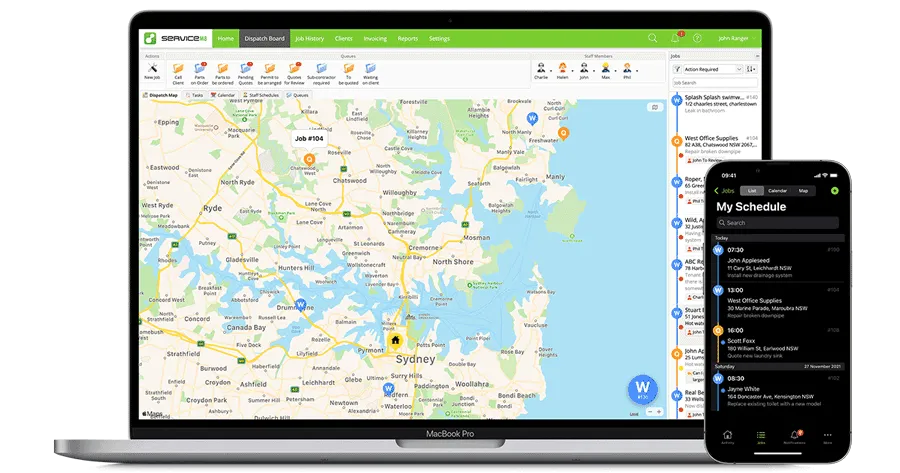
For a small operation the daily loop is covered properly. Scheduling is a drag-and-drop calendar with a dispatch map, and you can send a tech to a job on the spot. You get that on every plan, not held back for a higher tier. Your staff show up live on that map, with a daily GPS shift report behind it. Job details stay readable with no signal and sync once the phone finds service again. That counts for more on rural jobs and basement work than feature lists admit.
Owners tend to describe it as one joined-up system rather than a pile of features. An operations manager at a facilities firm called it easy to use and affordable. The same review praised the quote and invoice templates, the Xero accounting link, and the phone app field techs carry. An engineer at another facilities shop said it streamlined the back office, and that customers love the on-my-way notifications when a tech is on route.
Quotes can hold several options in one document, so you can show a customer good, better and best and let them accept online. You can send the invoice from the app on site. A two-way QuickBooks Online sync keeps invoices from being typed twice.
Several things other vendors charge extra for are free add-ons here. Customers can book themselves in 24/7, with a deposit if you want one. A Feedback tool collects testimonials and steers happy customers toward a Google review. There is a Mailchimp sync. Paid plans carry 24/7 email and chat support.
One catch: a new account arrives with most of that switched off. Set aside an evening to turn on the pieces you want and connect your accounting before you judge it.
Where it thins out
Two owner complaints are worth weighing before the good reviews carry you off. The same operations manager who liked the tool flagged that support runs through chat only, and that the agents often cannot say why an error happened. For a shop that leans on fast, knowledgeable help when something breaks mid-day, chat-only support is a real limit. The engineer added that the app is not as intuitive as expected, and that the Google Calendar link could be better. Neither is a dealbreaker, but plan for a learning curve.
Two feature gaps stand out for a shop that plans to grow past one van. Service agreements are the first. Recurring jobs and reminders do exist, so you can put a customer on a schedule and get prompted when the visit comes round. There is no dedicated membership module. Say you sell maintenance plans and want each one tracked and billed as a product, with a member list and renewals handled inside the software. This is not the tool that does it.
Marketing is the second. The Mailchimp sync and templates are free, and they cover getting a list out the door. There is no campaign builder inside the product. If you grow on email sequences, you will keep paying for something alongside it.
The metered pricing belongs here too, because it cuts both ways. A shop built on a few large projects a month pays almost nothing. High volume on small tickets pays more, even solo. Check your monthly job count against the tiers before you commit.
Who should buy it, and who should skip
Buy it if you work alone or run a crew of two or three, everyone carries an iPhone, and your work is mostly one visit and one invoice. At about $29 or $79 a month with unlimited logins, taking on an apprentice or a second van adds nothing to the bill. The free 30-job plan is a real starting point for someone still working out whether they have a business. One construction owner summed up the appeal in two words, excellent price, and said the connection never once dropped.
Skip it if a tech carries an Android phone and means to keep carrying it, because no tier or add-on solves that. Skip it if you sell maintenance memberships and want them managed as memberships. Skip it if you want campaigns sitting next to your dispatch board. And think hard if you are doing heavy volume on small tickets, where the meter turns against you and a flat or per-seat plan can land cheaper. Our ServiceM8 alternatives page lines the cross-platform options up.
A note on the evidence. The owner accounts here come from Capterra, which solicits its reviews and skews positive, so we weighted the praise lightly and the specific complaints more heavily. Read the chat-only support and the learning curve as the floor of those problems, not the whole of them. What we can tell you plainly is what it costs and what it does. Two things decide whether the price is the bargain it looks like: the phones in your techs' pockets, and the jobs you close in a month.
What owners actually say
More on the tools in this article

How we researched this
Pricing comes from the vendor's pricing page, or for quote-only tools from dated user-reported figures, current as of the review date. Owner quotes are verbatim, from real practitioner discussions, with the source linked. We don't take payment for placement.