ServiceM8 pricing (2026): what it costs by job count
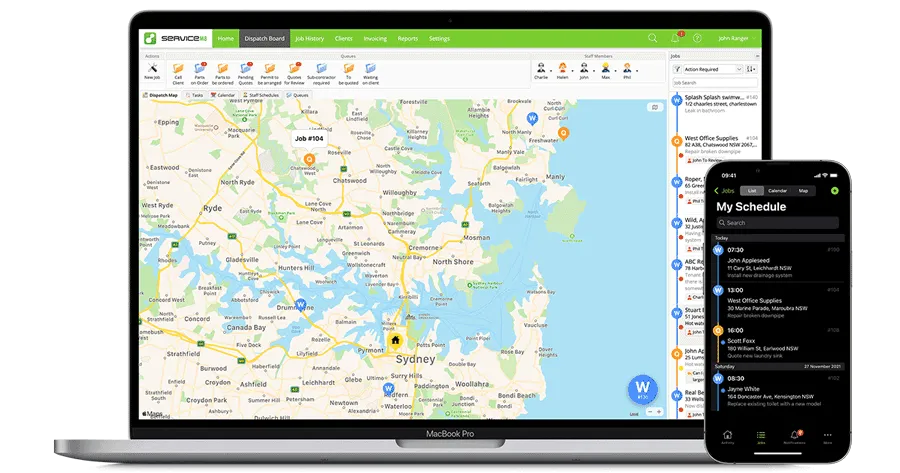
What each plan costs in August 2026
ServiceM8 publishes five prices and bills month to month. As of August 2026 the free plan covers 1 user, 30 jobs a month and 10 AI uses a day. Starter is $29 a month for 50 jobs, and it opens the model up: unlimited users and unlimited AI uses from that tier on. Growing is $79 a month for 150 jobs. Premium is $149 a month for 500 jobs. Premium Plus is $349 a month for roughly 1,500 jobs and above. There is a 14-day free trial sitting on top of all that.
Divide the price by the jobs and the pattern shows up fast. Starter works out at about 58 cents a job. Growing is about 53 cents. Premium drops to about 30 cents, and Premium Plus to about 23 cents. The software gets cheaper per job as you get busier. Per-seat tools do the opposite, because every hire adds a fixed line whether or not that person brings work in the door.
The free plan is a plan, not a countdown. One person, 30 jobs, no card needed. For an electrician doing a job a day on weekends it will hold for months. It caps AI at 10 uses a day and gives you a single login, so the week you take on a helper you are buying Starter.
Unlimited users is the whole pitch
Every paid plan includes unlimited users. No seat fees, no per-tech surcharge, no cap on how many people log in. In software terms, hiring is free.
Put numbers on it. Take a five-person crew: an owner, three techs and an office admin, all with their own login, closing 120 jobs a month. On ServiceM8 that is the Growing plan at $79 a month. A solo owner closing the same 120 jobs pays $79 too. The crew size never enters the calculation.
Now price those same five logins on a per-seat tool, using August 2026 figures. Jobber starts at $29 a month on annual billing and charges $29 a month for every user past a plan's included count. Housecall Pro runs $59 a month for Basic, $149 for Essentials and $299 for MAX on annual billing, with extra users at $35 a month. Four seats past the included count is $116 a month at Jobber's rate, or $140 at Housecall Pro's, before you have paid for the base plan.
So the shop that gains most here is the one growing its team. Big tickets help as well, because the meter cannot see revenue. A remodel outfit closing 40 jobs a month at $6,000 each pays $29 for software. A handyman closing 40 jobs at $180 each pays the same $29.
What happens when you run out of jobs?
Go past your monthly job allowance and ServiceM8 asks you to move up a tier. Your plan is a ceiling, so size it on your busiest month, not your average one. A shop that runs 140 jobs in February and 190 in July needs the 500-job plan for July.
That is where the gaps between tiers bite. Nothing sits between 150 jobs and 500. Run 170 jobs a month and you pay $149 for a plan you use a third of, which works out near 88 cents a job. That is worse than the tier below it and worse than the tier above it. The same wide gap sits between 500 jobs and 1,500.
One feature softens the ceiling. Taking card payments through ServiceM8 earns bonus jobs, and those get added to your monthly allowance. A shop that pushes most of its invoices through the built-in payments stretches its plan instead of climbing to the next one. Turn that on before you upgrade, not after.
Watch the text messages too. Each plan includes a monthly SMS allowance, and every message past the cap costs a standard fee. On-my-way texts, appointment reminders and quote follow-ups on every job add up quietly. Check the cap against your real job count rather than a guess.
The $9 Lite plan does not exist
Comparison sites list a ServiceM8 Lite plan at $9 a month for 15 jobs. That plan is not on the US pricing page, and the name is being misread. ServiceM8 Lite is the Android app. It is not a price tier.
The distinction matters more than the wrong number. The full ServiceM8 app runs on iPhone, iPad and Mac. Android phones get Lite, a reduced companion for technicians. A tech on a Pixel can pick up jobs and add notes. He is not running the software you are paying for.
Cost that in before you sign. Buying four company iPhones for four Android techs is real money, and it all lands in year one. On a $79 plan the handsets can cost more than three years of subscription. If your crew already carries iPhones, this line is free and the pricing stands as advertised.
Then the add-ons. Certain plans can bolt on extras from $19 a month, with Auto Routing the one owners ask about most. Forms can be added on any plan, including the free one. None of these are big numbers on their own. They are the difference between the sticker and the invoice, so total them at the plan you will end up on.
Who gets the cheapest bill, and who should buy seats
ServiceM8 gives the cheapest honest bill to a growing crew on moderate job volume, as long as everyone carries an iPhone. Three to eight people closing 100 to 400 jobs a month pay $79 or $149 flat, as of August 2026, while a per-seat rival charges for every login. That gap gets wider with every hire. Project work does well here too, because low job counts and high ticket values sit near the bottom of the ladder and stay there.
Buy per-seat instead if you run high volume on small tickets. A two-person drain-cleaning outfit doing 600 jobs a month pays $349. A ten-person crew doing 140 pays $79. Same software, four times the price, a fifth of the staff. A tool that charges by the head would treat that first shop better, and our ServiceM8 alternatives page lines those up. Skip it outright if your techs carry Android phones and mean to keep them, because no tier or add-on solves that.
A word on the evidence. The figures above come from ServiceM8's own US pricing page, checked in August 2026. Owners who pay it describe the same shape. A three-person locksmith shop said ServiceM8 costs less and does more than Housecall Pro, Kickserv, Jobber or Workiz, and that the $79 plan covers the work fine. Another locksmith picked it for the same reasons: cheaper, unlimited users, 500 jobs a month on the plan he was paying for. Both sit exactly where the arithmetic says a small crew on moderate volume should sit, which is the best check we have that the ladder behaves the way the page describes. What owners also talk about is the stack. A solo plumber setting up his business said he was leaning toward ServiceM8 for the jobs and Xero for the books. He wanted to hear from people running it every day. That pairing is a sensible start, and keeping job flow separate from accounting is usually cleaner than forcing one tool to do both. One test is worth running before you pay: build a fake job on your phone, add photos, turn it into an invoice, take the payment and push it to your accounts. If that takes too many taps standing on a driveway, keep looking.
Our ServiceM8 review covers what the software does on a job day. This page is about the money. Count the jobs in your busiest month, then count the Android phones in your crew. Those two numbers give you the price.
What owners actually say
More on the tools in this article

How we researched this
Pricing comes from the vendor's pricing page, or for quote-only tools from dated user-reported figures, current as of the review date. Owner quotes are verbatim, from real practitioner discussions, with the source linked. We don't take payment for placement.